Evo Tech
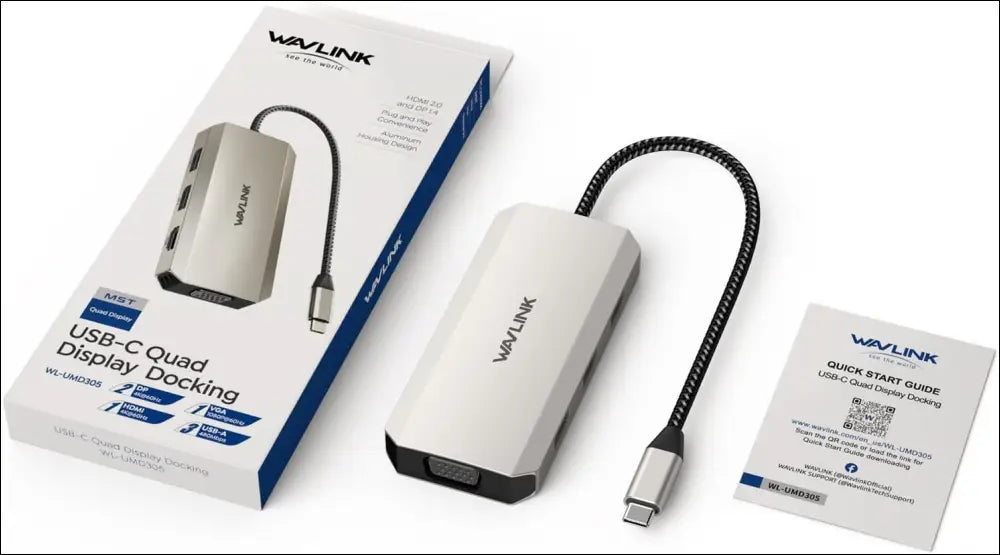
USB C Dock Quad Monitor, 7-in-1 Laptop Docking Station, Multiport Adapter with Dual 4K DP, 4K HDMI, 1080P VGA, 480Mbps USB2.0-A for MacBook, Dell
USB C Dock Quad Monitor, 7-in-1 Laptop Docking Station, Multiport Adapter with Dual 4K DP, 4K HDMI, 1080P VGA, 480Mbps USB2.0-A for MacBook, Dell
5.0 / 5.0
(6) 6 total reviews
Couldn't load pickup availability
Product Description
This 7-in-1 USB-C to HDMI/DP/VGA adapter supports single, dual, and triple 4K displays and quad 2K@60Hz displays (under DP1.4), it's portable enough for on-the-go use with an ultra-compact aluminum design!
Wide Device Compatibility
Compatible with a variety of host devices, including laptops, desktops, tablets/phones(with OTG function) and more. Expand your connection with mice, keyboards, printers, and USB storage devices with ease.
USB 2.0 Expansion
The three USB 2.0-A ports ensure a 480Mbps data rate to transfer movies or files when connecting with external hard drives and U disks. And effortlessly connect your other USB peripherals to streamline your workflow.
Durable Nylon-braided Cable
Built to withstand everyday use, the dock comes with a durable nylon-braided cable. The sturdy construction of the cable ensures reliable and long-lasting performance while also providing resistance against tangles and wear.
Portable Size
Boasts a compact and lightweight design, the mini dock fits conveniently into your bag—easy to carry along on your travels whether you're working from a coffee shop, attending meetings, or giving presentations.
How to check if your laptop's Type-C port supports video output?
Check the model of your laptop on the label on the back.
Google "brand + model number + manual" (e.g., "asus ux435 manual").
Check the Type-C specifications in the manual. If it mentions only "bandwidth," video output might not be supported.
How can I use this device more efficiently?
Your USB-C phones/tablets need to support OTG function.
Your host's Type-C port must support video output for full functionality of this hub.
When connecting this dock to a Windows laptop with four monitors, the host laptop's screen must be off.
What should I be mindful of when using this device?
Windows laptops can handle up to 4 monitors, but some may support only 3 due to graphics card limits.
Mac computers support only one independent external display; extra displays mirror the main screen due to system limits.
What makes this docking station special?
Rotation Mode, Clamshell Mode and HDCP are supported.
Frequently Asked Questions
Does the USB C Dock Quad Monitor, 7-in-1 Laptop Docking Station, Multiport Adapter with Dual 4K DP, 4K HDMI, 1080P VGA, 480Mbps USB2.0-A for MacBook, Dell include an Australian Warranty?
How soon will my order be dispatched?
Can EvoTech provide technical setup assistance for this product?
| Model Type | USB C Dock Quad Monitor, 7-in-1 Laptop Docking Station, Multiport Adapter with Dual 4K DP, 4K HDMI, 1080P VGA, 480Mbps USB2.0-A for MacBook, Dell |
| Auth Status | Verified Australian Stock |
| Support Channel | EvoTech Perth Technical Support |
Share